DocOrg
In-app tours, optimised filters & efficiency improvements, and more
We’re back with some great updates for all Architrave users. In this version, alongside optimised filters, visual tweaks and improved efficiency, we’re introducing a whole new way of communicating within the app.
In-app tours for new features and updates
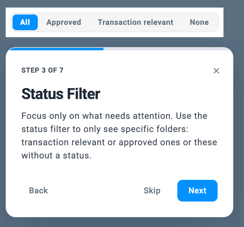
Never miss out on important features again. With our new tour feature, we’ll now keep you informed about changes directly within the app. Information right where you need it: new features are showcased exactly where you use them - no need to check external release notes or newsletters. We guide you step by step through the new features and highlight the relevant elements visually. Set your own pace as you click through, or simply skip the tour if you want to get started straight away.
New features in the Index View for smoother workflows
We have optimized the Index View for you: You can now filter folders by their status to keep only the items relevant to your current workflow step in view. Furthermore, the view can now be flexibly adjusted so that even longer folder names remain fully readable. Another new feature: You can now open a preview of the folder contents and view documents directly in the Index View - without any tedious jumping back and forth. You decide how you want to navigate: Choose whether you prefer to jump directly into the folder with a click or use the new preview.

Expanded filtering options in the Folder View
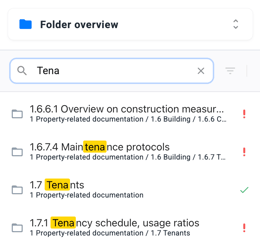
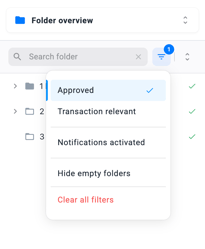
From now on, you can specifically filter folders in the Folder View by name or status. Use the search field to find specific folders quickly, or use our predefined filters for a targeted selection (e.g., transaction-relevant, approved, empty, or with activated notifications). Additionally, all folders can now be fully expanded or collapsed with just one click. This ensures you always maintain the perfect overview and work even more efficiently.
UI Modernization in the Cockpit and Document Organizer
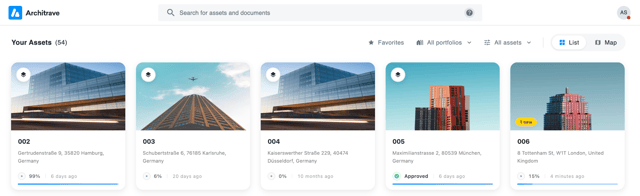
The Cockpit is sporting a fresh, modernized spring look. It features a cleaner design, clear control elements for the filters, and an improved progress indicator. Adjustments have also been made in the Document Organizer to provide a modernized user interface.
Document Viewer: Improved controls
We are pleased to see the new document viewer go live. Zooming and scrolling behavior has been significantly improved, making document viewing much more pleasant and faster - page jumps and blank spaces are a thing of the past. Additionally, the file name now has its own line resulting in a cleaner overall view and making long file names easier to read and copy.
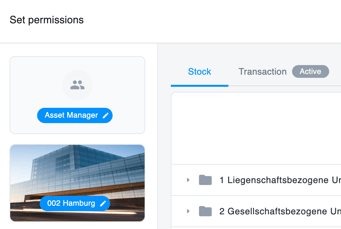
Administration: Active asset status in the permissions dialog
The asset's status is crucial in determining which permissions are applied. Previously, this status was only visible when selecting the asset. From now on, the active status will also be displayed on the tabs. This ensures it is clear at all times which permissions are active.
We hope you enjoy and benefit from the new features that are now available to you. In the background, we are already preparing the next updates and working diligently on our AI functionalities.